In the item sale line, there is a button labeled More. The More button contains options for working with the item directly from POS. If there are notes associated with the item, the More button will be green. If there is a pop-up note, the More button will blink.
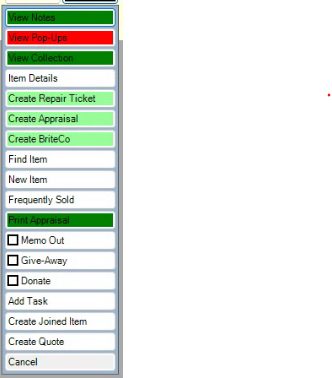
Depending on the situation and the item, options in the More button include:
|
View Notes
|
View notes in the item record.
|
|
View Pop-Ups
|
View pop-ups from the item record.
|
|
View Collection
|
Brings up other items that are part of that collection. See the section entitled Collections for more information.
|
|
Item Details
|
Opens the full record for the item.
|
|
Create Repair Ticket
|
Takes the item and adds it to a repair take-in.
|
|
Create Appraisal
|
Takes the item and adds it to an appraisal take-in.
|
|
Create BriteCo
|
Takes the item and adds it to a BriteCo take-in.
|
|
Find Item
|
Opens the Find Item filter to locate a different item or the item record.
|
|
New Item
|
Allows you to add inventory at point of sale. Permission may be required.
|
|
Frequently Sold
|
Opens a list of frequently sold items matching this item style.
|
|
Print Appraisal
|
Generates an appraisal of the item. This field appears only if an appraisal is available for the item.
|
|
Memo Out
|
Changes the item status to indicate that the customer has taken possession of the item before deciding to purchase it. Once this is done, it works much like a layaway. You can take a deposit, take payments, etc. The difference is that with memo out, the item leaves the store.
|
|
Giveaway
|
Marks the item as a promotional giveaway. See the section entitled Promotional Giveaways for more information.
|
|
Donate
|
Marks the item as a donation. See the section entitled Donating an Item for more information.
|
|
Add Task
|
Creates a new task with this item added to it.
|
|
Create Joined Item
|
If you have more than one item or service pickup on the sale(cannot be a previously joined item or service), you can create a joined item.
|
|
Create Quote
|
Click to create a quote for this item.
|
|
Cancel
|
Closes the More sub-menu.
|