To locate a particular item within your inventory:
- Select Market > Find from the Main menu.
- Choose your details in the Marketplace Find window tabs as described below to search for an item. As always, the Presets feature allows you to save search parameters for future use. See the Edge Navigation Basics section entitled Presets for more information.
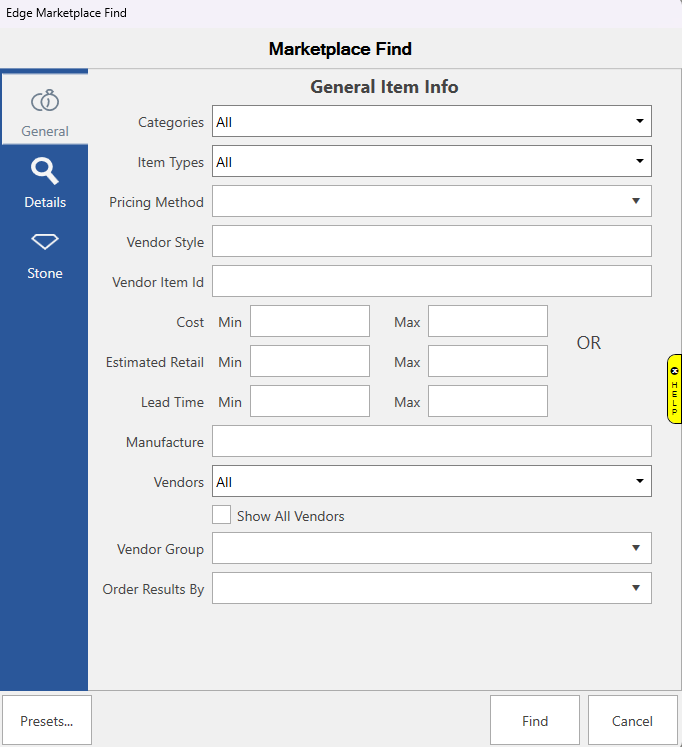
Fields and options in the General tab include:
|
Categories
|
Returns items in the specified category selected from the drop-down list.
|
|
Item Types
|
Returns items matching the item type selected from the drop-down list.
|
|
Pricing Methods
|
Returns items priced in one or more of the following pricing methods:
|
|
Vendor Style
|
Returns items matching the style number entered
|
| Vendor Item ID |
Returns items matching the Vendor item id entered.
|
|
Cost Range: Min
Cost Range: Max
|
Returns items with a cost greater than or equal to the indicated amount.
Returns items with a cost less than or equal to the indicated amount.
|
|
Estimated Retail Range: Min
|
Returns items priced at greater than or equal to the indicated amount.
|
|
Estimated Retail Range: Max
|
Returns items priced at less than or equal to the indicated amount.
|
|
Lead Time Range: Min
|
Returns items with a lead time greater than or equal to the indicated number of days.
|
|
Lead Time Range: Max
|
Returns items with a lead time less than or equal to the indicated number of days.
|
|
Manufacturer
|
Returns items from the manufacturer you entered.
|
|
Vendors
|
Returns items from the vendor(s) selected from the pull-down list.
You can also check the box underneath to Show All Vendors, not just the vendors you already have a relationship with.
|
|
Vendor Group
|
Returns items from the vendor group(s) selected from the pull-down list.
|
|
Order Results By
|
Your results will be sorted by the field you choose in the pull-down list.
|
NOTES:
• Filter parameters are cumulative. That is, the more parameters you enter, the fewer items will be returned. For example, if you choose a category and a Vendor Style, only items with matches in BOTH fields will be returned. This applies to parameters on all the tabs.
- Complete the General Item Info tab fields, if any, as needed to retrieve the appropriate data.
- If needed, select the Item Details Info tab.
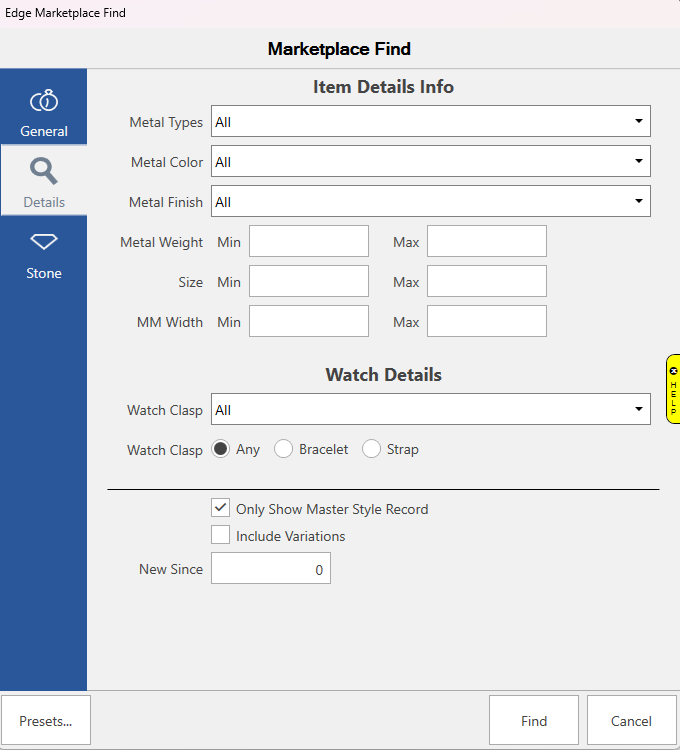
Fields and options in the Watch Details section include:
| Watch Clasp |
Returns items matching the watch clasp(s) you selected in the pull-down list. |
| Watch Band |
Choose the watch band type you want to include or choose Any for all bands. |
______________________________________________________________
|
Only show Master Style Record
|
Check this box to only show Master Style Records in the results
|
|
Include Variations
|
Check this box include variations in your results.
|
|
New Since
|
Enter the numbers of days that you see items newer than.
|
- Complete the Item Details Info tab fields as needed, if any, to retrieve the appropriate data.
- Select the Stones tab, if needed.
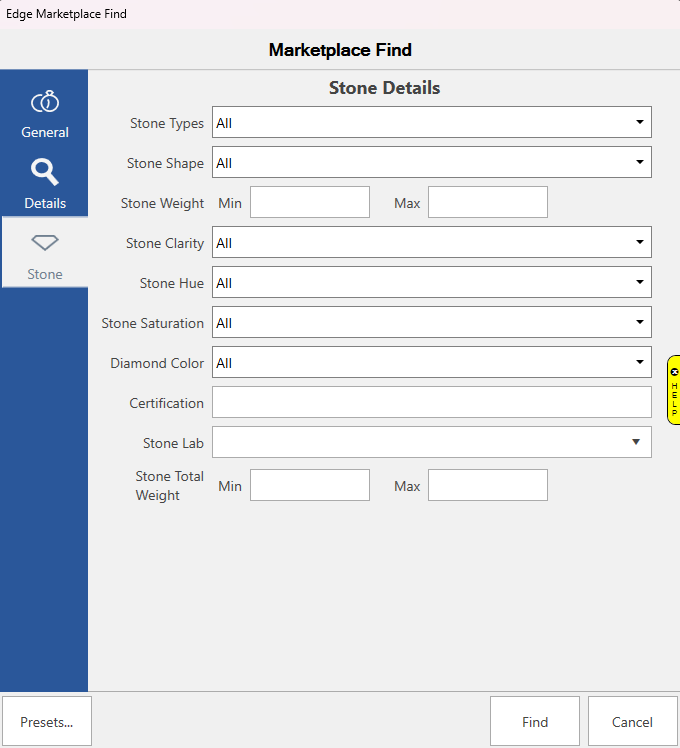
Fields in the Stones Details tab include:
|
Stone Types
|
Returns stones matching the type you select in the pull-down list.
|
|
Stone Shape
|
Returns stones matching the shape you select in the pull-down list.
|
|
Stone Weight Min
|
Returns stones with a weight greater than or equal to the indicated weight.
|
|
Stone Weight Max
|
Returns stones with a weight less than or equal to the indicated weight.
|
|
Stone Clarity
|
Returns stones matching the clarity you select in the pull-down list.
|
|
Stone Hue
|
Returns stones matching the hue you select in the pull-down list.
|
|
Stone Saturation
|
Returns stones matching the saturation you select in the pull-down list.
|
|
Diamond Color
|
Returns stones matching the diamond color you select in the pull-down list.
|
|
Certification Stone Lab
|
Returns stones matching the certification number you entered. Returns stones matching the lab you select in the pull-down list.
|
|
Stone Total Weight Min
|
Returns stones with a total weight greater than or equal to the indicated weight.
|
|
Stone Total Weight Max
|
Returns stones with a total weight less than or equal to the indicated weight.
|