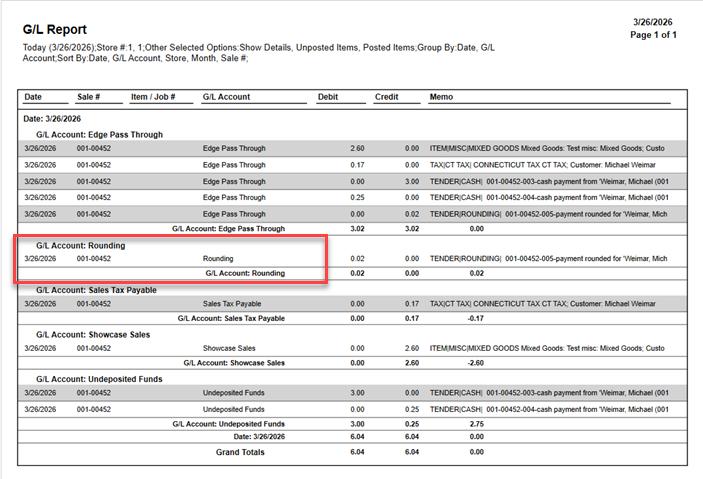
Stores integrated with QuickBooks that have opted to use the new Round to Nickel feature introduced beginning with Edge version 26.1.0.309 must map the required account to prevent balances from appearing in the Edge Pass Through. Mapping this new account is a quick process and is mapped the same way as other QuickBooks accounts.
To map the required account:
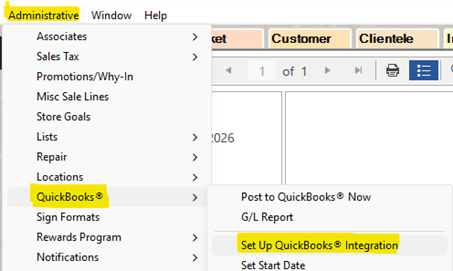
- From the main menu navigate to Administrative > QuickBooks > Setup QuickBooks Integration.
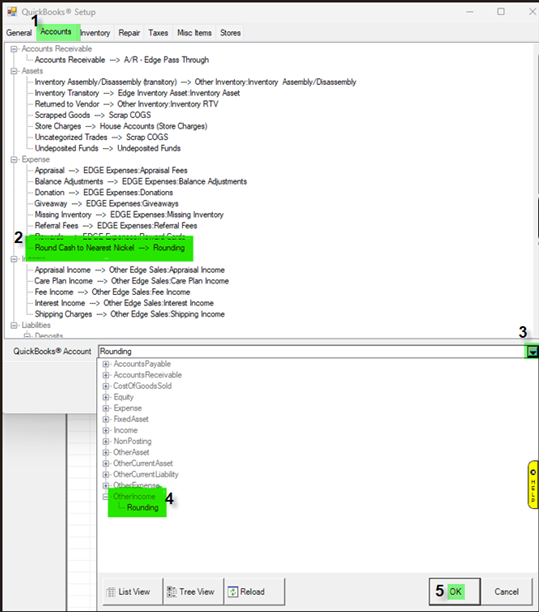
- Click the Accounts Tab and select Round Cash to Nearest Nickel.
- Next, click the QuickBooks Account dropdown menu and select Rounding.
- Click OK to save this as the Account for mapping Round Cash to Nearest Nickel.
- Back on the QuickBooks Setup screen click OK a second time Save your changes.
Below is an example of how your GL report will look with this new mapped account: