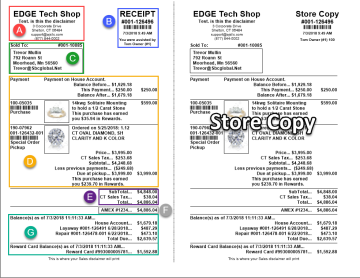
The receipt is designed to be printed landscape and is split into a customer and store copy. We recommend using perforated paper.
|
A
|
Your store name and address as defined by your Edge license; can also display logo if specified in System Options
|
|
B
|
Receipt number, barcode, date/time, and associate; scan this barcode to load the customer at POS
|
|
C
|
Customer details; if entered, shipping information will appear to the right of this
|
|
D
|
Transaction details; scanning one of these barcodes will initiate a return for that line item only
|
|
E
|
Subtotal, tax, and total
|
|
F
|
Payment information
|
|
G
|
Summary of open balances
|