The receipt preview allows you to view the receipt on the screen. You can use the checkboxes on the left to choose what details to include.
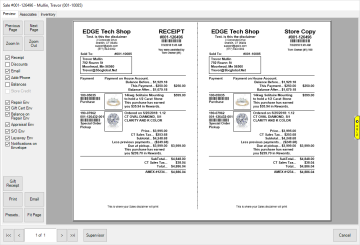
Tabs, buttons, and options in this window include:
|
Preview
|
Tab shows preview of receipt
|
|
Associate
|
Tab shows associates on this transaction
|
|
Inventory
|
Tab shows inventory items on this sale
|
|
Prev/Next Page
|
View previous / next page
|
|
Zoom In/Out
|
Zoom in or out
|
|
Gift Receipt
|
Opens the Gift Receipts window allowing you to select transaction details to include on a gift receipt; gift receipts print without prices
|
|
Print
|
Print the receipt and, if present and checked, any job envelopes
|
|
Email
|
Email the receipt and, if present and checked, any job envelopes
|
|
Fit Page
|
Resizes preview to fit in current window
|
|
Supervisor
|
Opens supervisor menu; see Receipt Supervisor Options for more information
|
The checkboxes on the left include:
| Receipt |
Disables receipt page. Envelopes and claim checks still print |
| Discounts |
Show or don't show discounts |
| Email |
Show or don't show Email in customer info |
| Addr/Phone |
Show or don't show address and phone in customer info |
| Balances |
Show or don't show balances |
| Credit Memo |
If balances are shown, show or don't show Credit Memo balances |
| Repair/Gift Cert/Appraisal/SO/Layaway Env |
include respective envelopes or not |
| Balance on Repair Env |
Independent from other balance button. Show or don't show remaining balance for that job on job envelope |
| Notifications on Envelope |
Show or don't show selected notification methods on job envelope |
| Print Envelopes Only |
Disables receipt page. Envelopes and claim checks still print. Checking this will automatically uncheck Receipt and receipt-related options |
| Job/Task Barcode Env |
prints a scannable barcode on envelope for respective job/task |