Edge is now integrated with LeadsOnline, a database of second hand transactions, giving you the ability to upload Trades transactions electronically into your LeadsOnline database for tracking potential theft nationwide with real-time customer validation at POS. LeadsOnline is free for businesses, and does not require an additional, separate Edge subscription for activation.
Simply enable the feature through a series of new System Options and Edge handles the rest at POS based on your set options. With these options you can instruct Edge to Always Upload Trades, Prompt at POS for each transaction, or Never Upload. Access a record of your submitted Trades at any point conveniently through your LeadsOnline production site.
Getting Started
The LeadsOnline integration is activated using LeadsOnline API credentials provided to you by LeadsOnline and are Edge integration specific credentials. If you do not already have an existing LeadsOnline account, one can be created for free through the LeadsOnline website. Once registered, LeadsOnline Support will provide credentials and instruct you on how to log in and verify transactions have gone through successfully.
 Existing LeadsOnline users may request API Credentials by contacting support@leadsonline.com and being sure to state that you need API Credentials for your POS software – Abbott Jewelry Systems.
Signing Up with LeadsOnline
For any stores not already signed up with LeadsOnline may register for free following the steps below:
- Visit their website or follow the link below which takes you directly to the registration page:
LeadsOnline - Register Business
- Fill out the Account and Contact sections then proceed to the Business Information section.
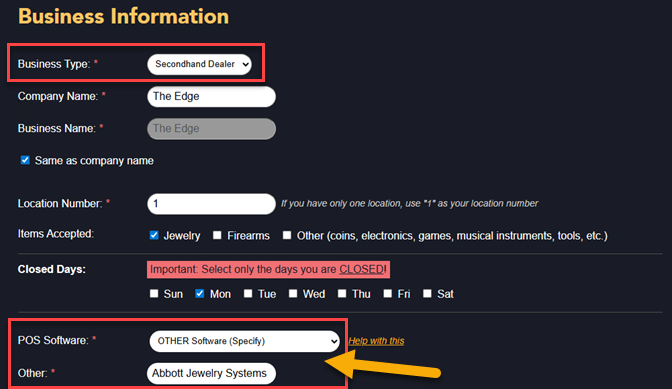
- With some exceptions, most stores will select Secondhand Dealer for Business Type.
NOTE: These fields below MUST be filled out as shown, as this alerts LeadsOnline Support you require those API Credentials:
POS System - select ‘OTHER Software’ and for Other - type in ‘Abbott Jewelry Systems’
- Click Submit to register. A LeadsOnline Support member will contact you and provide the API Credentials to complete your Edge integration, as well as walk you through logging in and verifying transactions on the LeadsOnline production site.