To set the System Option for LeadsOnline:
- Navigate to Administrative > System Options.
- Search or scroll down to the LeadsOnline section.
|
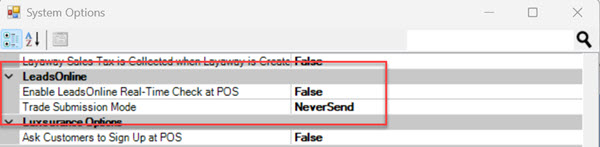
Enable LeadsOnline Real-Time Check at POS
|
When enabled (set to True), POS enforces LeadsOnline real-time customer validation at POS. This makes a driver’s license required for Trade/Buy transactions and will check the customer against their ‘Do-Not-Buy’ list using that license number. This option is set to False by default.
|
|
Trade Submission Mode
|
Controls how Trades are sent to LeadsOnline once the sale is completed. There are 3 available choices:
- Never Send – The system Default option. This means Trade Submission is Disabled and will never send to LeadsOnline.
- Prompt at POS - A prompt will appear asking the user to select whether or not to send Trade to LeadsOnline.
- Always Send - Will automatically send all Trades to LeadsOnline after sale completion.
|
- Make your selections and click Save to apply your changes.